
How to Build a Custom Remote Patient Monitoring App: Architecture, Devices, and Compliance - The 2026 Build Playbook
This guide explains how to build a custom remote patient monitoring (RPM) app using connected medical devices, cloud infrastructure, FHIR-based EHR integration, clinician dashboards, and secure patient workflows. It covers RPM architecture, device connectivity, HIPAA and FDA compliance, AI/ML capabilities, reimbursement engineering, and enterprise deployment considerations for 2026.
Play Voice
Yogesh Karachiwala
VP of Engineering
September 16, 2026
Key Insights
- A modern RPM platform consists of five connected layers: Device, Gateway, Cloud, Clinician Dashboard, and EHR Integration.
- Devices collect patient vitals, while the gateway securely transmits data through Bluetooth, WiFi, or cellular networks.
- The cloud layer stores and processes patient data, generates alerts, and supports analytics and reporting.
- Clinician dashboards turn raw data into actionable insights, helping care teams monitor patients and intervene when needed.
- EHR integration ensures observations, care activities, and billing related information flow directly into clinical systems.
- Security, compliance, and data validation should be built into every layer of the architecture.
- A successful RPM platform connects the entire care journey, from patient readings to clinical action and reimbursement documentation.
The digital healthcare market is undergoing a structural shift. Recent industry data from McKinsey and Statista shows that the global remote patient monitoring market is projected to reach $6.1 billion by 2030. Healthcare providers are rapidly moving away from legacy, episodic care models toward continuous, data-driven disease management. This change is accelerated by significant updates to reimbursement structures and a growing demand for scalable clinical workflows. This guide serves as a practical engineering playbook for product leaders and healthcare entrepreneurs. It marks the technical and commercial culmination of our Internet of Medical Things (IoMT) series.
Zymr helps healthcare organizations accelerate digital transformation through modern healthcare IT solutions. We build EHR/EMR systems, telehealth platforms, AI-driven healthcare applications, and secure data-management infrastructures that enable better care coordination, operational efficiency, regulatory compliance, and patient experiences.
The RPM Build Decision in 2026: Market Size, Reimbursement Clarity, and FDA Device Requirements
Building a custom RPM solution in 2026 requires a deep understanding of market opportunities, regulatory boundaries, and insurance reimbursement policies. The days of treating remote monitoring as an experimental pilot program are over. Today, it stands as a core component of sustainable clinical delivery.
Three powerful industry forces have aligned to create a highly favorable environment for building custom platforms:
- Growing Market Value: The sustained growth toward a $6.1 billion market valuation reflects a permanent shift in how providers manage patient populations outside traditional clinic walls.
- Favorable Reimbursement Updates: Recent CMS Current Procedural Terminology (CPT) updates have significantly lowered the barriers to billing. The introduction of code 99470 allows providers to bill for a shorter 10-minute clinical threshold, while code 99445 establishes an accessible 2-day data transmission minimum. This provides immediate financial viability for short-term and acute monitoring scenarios.
- Stricter Regulatory Enforcement: Modern billing rules state that manual patient data entry is no longer billable. Platforms must rely entirely on FDA-cleared devices capable of automated digital transmission.
This environment eliminates the viability of generic, text-heavy wellness trackers. Software engineers must position automated data collection and strict regulatory compliance as foundational requirements of the application core.
Which Clinical Use Case Should Your RPM App Target?
Before laying down the first line of code, you must define your clinical scope. The target medical condition dictates your entire engineering path, including your device integrations, alert thresholds, user experience patterns, and reimbursement pipelines. Attempting to build an all-in-one RPM app that serves every medical specialty simultaneously leads to bloated software architectures and fractured user experiences.
The market generally splits into four primary clinical focus areas:
- Chronic Care Management: This includes long-term conditions like diabetes, hypertension, heart failure, and chronic obstructive pulmonary disease (COPD). The architecture must support continuous, longitudinal data ingestion. It relies heavily on periodic daily readings from blood glucose meters, blood pressure cuffs, weight scales, and pulse oximeters.
- Post-Acute Care and Remote Surgical Recovery: This model tracks patients during the critical 30 to 90 days following hospital discharge or major surgery, such as orthopedic or cardiac procedures. The technical priority shifts to short-term, high-frequency data streams. It often utilizes continuous wearable patches to monitor vital signs and catch early complications before they lead to hospital readmission.
- Hospital-at-Home Programs: This setup treats high-acuity patients who would otherwise require an inpatient hospital bed. The application must support near-real-time streaming of continuous telemetry data, including electrocardiograms (ECGs) and respiratory rates. It requires immediate, high-priority alert routing workflows to manage critical changes in patient status.
- Behavioral Health and Neuropsychiatric Monitoring: This use case tracks passive behavioral indicators such as sleep architecture, physical activity metrics, and medication adherence signals. These data streams are paired with active, patient-reported outcomes collected through digital clinical questionnaires.
By anchoring your product design within a specific clinical use case, you can optimize your development timelines. This targeted approach ensures you do not waste engineering resources on unnecessary device drivers or redundant dashboard views.
BYOD vs Purpose-Built Devices vs Hybrid: How to Choose Your RPM Device Strategy
Choosing how devices connect to your software platform is a critical decision in your product strategy. This choice directly impacts your development costs, operational complexity, and billing eligibility.
Bring Your Own Device (BYOD)
The BYOD strategy integrates your software ecosystem with consumer health frameworks like Apple HealthKit or Google Fit, allowing patients to sync their existing commercial smartwatches, scales, and fitness trackers.
Best For: Preventive wellness initiatives, lifestyle coaching programs, and low-risk population health monitoring where direct insurance reimbursement is not the primary business driver.
Pros:
- Eliminates upfront hardware procurement costs and supply chain logistics.
- Accelerates user adoption since patients use familiar devices they already own.
- Reduces ongoing customer support overhead related to physical product returns.
Cons:
- Most consumer wearables are not registered medical devices and fail to meet the strict automated digital transmission requirements needed for traditional billing.
- Inconsistent data frequency due to manual app syncing or dead device batteries can result in unbillable months.
Purpose-Built, Vendor-Provisioned Devices
This model distributes pre-configured, medically cleared hardware (such as cellular-embedded blood pressure cuffs or pulse oximeters) directly to the patient's home. These devices bypass personal smartphones entirely by transmitting encrypted vital data over cellular networks immediately after a reading is taken.
Best For: High-acuity chronic care programs (e.g., severe hypertension, heart failure) and elderly patient populations who lack smartphones or technical literacy.
Pros:
- Guarantees 100% compliance with digital transmission rules, securing full eligibility for codes 99454 and the new 2-day threshold code 99445.
- Out-of-the-box functionality removes the frustration of Bluetooth pairing, dropping 30-day patient attrition significantly.
- Standardized data formats make ingestion, parsing, and data validation highly reliable.
Cons:
- Requires substantial upfront capital investments for inventory purchase and warehouse storage.
- Forces your software company to take on physical logistics, including device shipping, sanitization, and hardware returns.
The Hybrid Model
The hybrid approach balances cost and compliance by using a multi-stream data pipeline. The application requires purpose-built, FDA-cleared hardware to capture the core physiological readings required for billing validation, while simultaneously pulling lifestyle and behavioral metrics from the patient's personal smartphone and fitness trackers.
Best For: Scalable, commercial-grade remote monitoring programs targeting multi-morbid conditions where clinical validation and patient engagement must coexist.
Pros:
- Maximizes financial return by ensuring the core physiological data streams meet regulatory standards for reimbursement.
- Enriches clinical context by combining official vital signs with continuous passive background data like sleep patterns and daily step counts.
- Lowers overall hardware overhead by only purchasing medical-grade devices for necessary metrics.
Cons:
- Requires a highly complex backend architecture to ingest, separate, and validate data coming from multiple disparate sources.
- Demands strict data tagging and partition rules to prevent consumer-grade metrics from mixing into billing audit trails.
The RPM Reference Architecture: Device → Gateway → Cloud → Clinician → EHR
A successful RPM platform is much more than a mobile app connected to a wearable device. It is a multi layer system that securely moves clinical data from the patient to the care team while maintaining compliance, reliability, and reimbursement readiness.
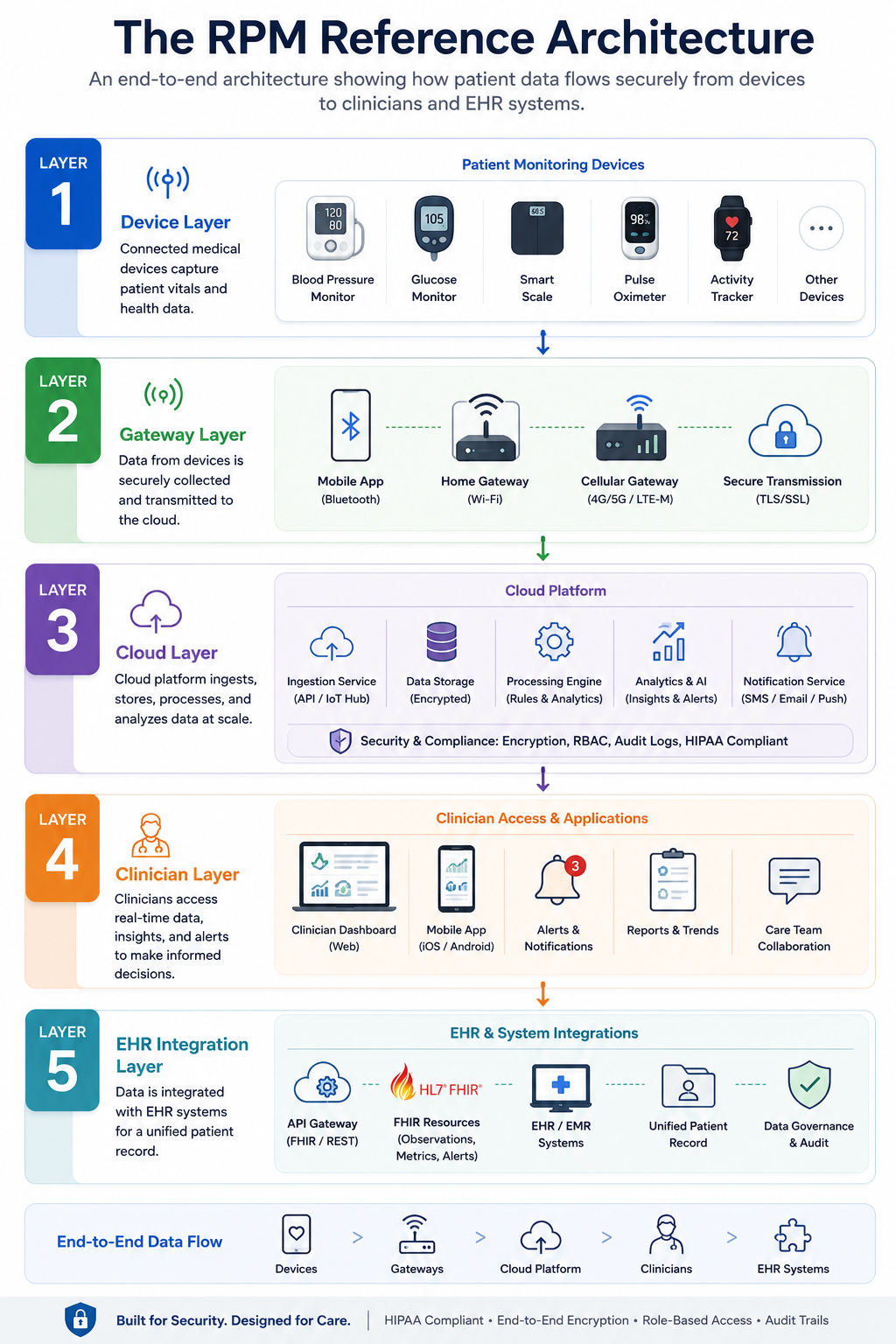
At a high level, modern RPM platforms follow a five layer architecture: Device → Gateway → Cloud → Clinician → EHR. Each layer performs a specific function and introduces its own security, validation, and governance requirements.
Layer 1: Device Layer
The architecture begins with connected medical devices that collect patient data in real time.
Common RPM devices include:
- Blood pressure monitors
- Glucose meters
- Pulse oximeters
- Weight scales
- ECG monitors
- Wearable sensors
At this layer, validation focuses on device accuracy, FDA clearance status, and data integrity. Invalid or incomplete readings should be filtered before entering the clinical workflow.
Layer 2: Gateway Layer
Once data is captured, it must be transmitted to the platform. The gateway layer acts as the communication bridge between devices and cloud services.
Typical connectivity options include:
- Bluetooth
- WiFi
- Cellular networks
- Device specific hubs
This layer handles device authentication, encrypted transmission, connectivity management, and retry logic when network interruptions occur.
Layer 3: Cloud Layer
The cloud layer serves as the operational backbone of the RPM platform.
Here, patient observations are ingested, validated, processed, and stored using FHIR aligned data models. Modern architectures typically use containerized services, real time event processing, and time series databases to support large scale monitoring.
Key responsibilities include:
- Data ingestion
- FHIR storage
- Alert generation
- Audit logging
- Analytics and reporting
Security controls such as AES 256 encryption, TLS 1.3, RBAC, and comprehensive audit trails are typically enforced here.
Layer 4: Clinician Layer
The clinician dashboard transforms raw data into actionable clinical insights.
Care teams use this layer to:
- Review patient trends
- Receive threshold alerts
- Prioritize high risk patients
- Document interventions
- Track monitoring activities
This is where alert fatigue can either be reduced or amplified. Effective RPM platforms provide configurable thresholds, risk scoring, and workflow based alert management rather than overwhelming clinicians with notifications.
Layer 5: EHR Integration Layer
The final layer connects RPM workflows directly to the healthcare system of record.
Using FHIR based integration, patient observations, intervention notes, and monitoring activities are exchanged with EHR platforms such as Epic, Cerner, and athenahealth. This ensures clinical documentation remains complete and reimbursement workflows can operate without manual data entry.
The EHR layer typically supports:
- Observation updates
- Patient context retrieval
- Care plan synchronization
- Billing documentation
- Compliance reporting
Why Does This Architecture Matters?
Many RPM initiatives focus heavily on devices and mobile applications while underestimating the complexity of cloud workflows, clinician operations, and EHR integration. In practice, long term success depends on all five layers working together seamlessly.
The strongest RPM platforms treat every layer as a controlled boundary with its own security, validation, and compliance requirements. That approach creates a system that is not only technically scalable, but also clinically useful and reimbursement ready.
Patient Mobile App Layer: Onboarding, Daily Readings, Education, Communication
The patient mobile app layer acts as the direct software interface between an individual at home and their clinical care team. It converts physical vital signs into structured digital information. To support continuous medical monitoring and maintain compliance, the app must deliver frictionless patient onboarding, automated data collection pipelines, targeted educational micro-content, and secure communication channels. In 2026, the primary focus of this layer has shifted from manual data tracking to accessibility-first design patterns that prevent user abandonment among elderly and chronically ill populations.
To maximize patient adherence and secure consistent data transmission, the mobile application layer requires several foundational engineering elements:
1. In-Depth Architectural Blueprint
Building a patient-facing application for clinical remote monitoring requires moving away from traditional consumer app development patterns. The core user base often suffers from visual impairments, cognitive decline, or limited motor coordination. If a patient cannot figure out how to transmit a reading during their first week, your system loses the continuous data stream needed to support health outcomes and monthly billing codes.
2. Inclusive Accessibility Architecture
The frontend codebase should avoid fixed layouts in favor of responsive interface components that adapt smoothly to system-wide accessibility configurations.
- Dynamic Type Scaling: Text containers must use relative layout units instead of hardcoded pixel sizes, ensuring text remains clear and readable when font sizes are scaled up by the user.
- Optimized Hit Targets: Interactive elements must feature tap surfaces of at least 48x48 independent pixels, providing plenty of space between buttons to prevent accidental clicks.
- Screen Reader Compatibility: All interactive fields, form components, and chart readouts must include descriptive accessibility labels and semantic landmarks to allow easy navigation via screen readers.
3. Contextual Engagement and Notification Triggers
The application should use local notifications backed by centralized cloud rules to establish consistent measurement habits without overwhelming the patient. Instead of sending generic alarms, notification schedules should align with the patient’s real-world routines, such as morning medication schedules or post-meal rest periods. If a required vital sign reading is missed, the application can escalate the reminder by sending a fallback SMS notification or triggering an interactive voice confirmation loop.
4. Secure Communication Gateways
All messaging, file exchanges, and video interactions within the patient app must travel over encrypted communication channels. Text conversations are managed through web sockets running over secure TLS 1.3 tunnels, while video consultations use encrypted WebRTC connections. This ensures that personal health queries, symptoms, and medical advice are visible only to the patient and their approved clinical care team.
Clinician Dashboard Layer: Real-Time Vitals, Threshold Alerts, and Intervention Workflow
An RPM clinician dashboard is an enterprise web workspace used by care coordinators and physicians to monitor large groups of patients simultaneously. It aggregates continuous vital streams, runs real-time alert systems, and manages patient intervention workflows. Modern dashboards focus heavily on population triaging to reduce alert fatigue, combined with background time-tracking mechanisms that automatically document care minutes to fulfill strict insurance reimbursement and compliance requirements.
An enterprise-grade clinical dashboard requires the following core capabilities:
- Automated Risk Triaging: The central landing view should utilize a clinical sorting system that automatically ranks patient cohorts based on risk severity, sudden baseline shifts, or missed monitoring days. This allows care teams to quickly identify and prioritize deteriorating patients who require immediate medical attention.
- Granular Patient Analytics: Selecting an individual patient profile opens an interactive clinical workspace that displays multi-metric trend charts, moving averages, and cross-vital correlations. This visualization makes it easy for clinicians to see exactly how changes in one vital sign, like weight gain, might correspond with changes in another, like dropping blood oxygen levels.
- Flexible Threshold Customization: Care teams must have the ability to apply standardized clinical guidelines across patient groups, while retaining the flexibility to adjust specific alert limits for an individual patient. This customization reduces false alerts caused by expected baseline variations in complex or multi-morbid cases.
- Audit-Ready Intervention Logging: The platform features an integrated, background time-tracking framework that automatically logs the exact minutes clinical staff spend reviewing data, responding to alerts, or messaging patients. This system converts daily clinical activities into clean, time-stamped audit trails required to back up monthly insurance reimbursement claims.
Cloud and Data Architecture: Device Gateway, FHIR Storage, and Alerting Engine
The backend cloud architecture of an RPM platform is a distributed, secure computing network designed to ingest, process, and store continuous health data from remote devices. It consists of a dedicated device gateway for protocol translation, a time-series database optimized for high-volume vital trends, an independent stream processing engine for real-time alert evaluation, and a Fast Healthcare Interoperability Resources (FHIR) repository for secure clinical data exchange. .
The cloud data ecosystem relies on four interconnected technical systems:
- Scalable Data Ingestion: The ingestion layer uses lightweight communication protocols like MQTT or CoAP alongside traditional HTTPS REST endpoints to manage device connections smoothly. These protocols handle transmission securely even when patients are using low-bandwidth cellular networks in remote locations.
- Optimized Dual-Tier Storage: The data engine splits incoming information into two distinct storage pathways to balance performance and compliance. High-frequency, raw vital data streams directly into a time-series database optimized for trend analysis, while verified clinical events, patient metadata, and care logs are written to an enterprise-grade FHIR R4 repository.
- Real-Time Data Processing: A decoupled stream processing framework continuously evaluates incoming vital readings against preset clinical alert thresholds as the data arrives. This rules engine operates completely independently of the main transactional database, allowing the system to send immediate notifications without slowing down application performance.
- Enterprise-Grade Encryption: To maintain a secure environment, all data must be protected using strong AES-256 encryption at rest and TLS 1.3 encryption in transit. This data safety is reinforced by rigorous cryptographic key rotation schedules and isolated database instances for different healthcare clients.
How to Engineer HIPAA Compliance Into an RPM App in 2026
Engineering HIPAA compliance into an RPM app requires implementing strict technical, administrative, and physical safeguards to protect electronic Protected Health Information (ePHI). Key technical mandates include end-to-end data encryption using AES-256 and TLS 1.3, granular role-based access control (RBAC), and immutable audit logs. Recent 2026 HIPAA Security Rule updates explicitly transition multi-factor authentication (MFA) and technology asset inventories from optional or "addressable" guidelines into strict, legally required baselines for all connected healthcare platforms.
The financial stakes are high, and regulatory oversight is tight. The Department of Health and Human Services (HHS) has removed the historical "addressable" loopholes from the HIPAA Security Rule. For product engineering teams, this structural change turns what used to be a best-practice checklist into concrete coding requirements. To safeguard your application against vulnerabilities and pass modern regulatory audits, your development team must build these protection mechanisms directly into your core code:
1. Identity Verification and Access Management
Every user environment, including patient mobile applications, clinical dashboard workspaces, and internal DevOps maintenance pipes, must strictly enforce multi-factor authentication.
- Systems should use OAuth 2.0 protocols paired with OpenID Connect to handle identity verification securely.
- For clinician dashboards, integration with enterprise identity providers via SAML or OIDC allows healthcare teams to use secure Single Sign-On (SSO) workflows, reducing sign-in friction without compromising security.
- Front-end clients must use automated session timeouts, dropping user connections after two minutes of inactivity on patient applications and locking clinician portals within 15 minutes to prevent unauthorized physical access.
2. Comprehensive Device and Data Flow Inventories
You cannot protect data if you do not know where it lives. Compliance audits require your organization to maintain a live, automated asset inventory and a matching data network map. Your documentation must visually illustrate exactly how ePHI moves from the physical remote health sensor, through the mobile application, across cloud ingestion engines, and into long-term database storage. Every third-party API or cloud microservice that touches patient health data must be explicitly logged, and every external vendor must provide an annual verification of their compliance status alongside a signed Business Associate Agreement (BAA).
3. Cryptographic Guardrails for Mobile Operating Systems
Because patient-facing applications run on unmanaged consumer smartphones, the mobile codebase requires advanced runtime self-protection (RASP) mechanisms to protect data locally:
- Certificate Pinning: The mobile app must explicitly hardcode the cloud server’s cryptographic signature. This step prevents the app from trusting rogue certificates and blocks man-in-the-middle network attacks.
- Jailbreak and Root Detection: If the application detects that it is running on a compromised or modified operating system, it must block access immediately and wipe any locally cached data.
- Secure Key Storage: Cryptographic keys must live inside dedicated hardware security modules on the device, such as iOS Secure Enclave or Android Keystore Systems. These keys should be bound directly to biometric authentication prompts.
- Screen-Recording Restrictions: The application should programmatically disable screen capturing, screen sharing, and video recording across all screens that display personal health readings or patient charts.
4. Immutable Audit Logs and DevSecOps Practices
To meet compliance requirements, your cloud environment must record every single data interaction in an unchangeable audit log. Every instance of creating, viewing, updating, or deleting health information must log the unique user ID, timestamp, IP address, and the specific data fields accessed. These logs should flow directly into an isolated security information and event management (SIEM) system with write-once, read-many storage configurations. This setup prevents anyone, including system administrators, from altering historical records.
By prioritizing automated vulnerability tracking and adopting a continuous DevSecOps development approach, your engineering team can catch security issues early, keeping your platform fully compliant and audit-ready.
When Does an RPM App Become an FDA-Regulated Medical Device?
An RPM application is classified as Software as a Medical Device (SaMD) if it goes beyond merely displaying or transmitting data and instead performs functions intended to diagnose, treat, or mitigate diseases. If an app runs algorithms to interpret vital signs, recommend changes to medication dosages, or replace a doctor's active clinical judgment, it falls under the regulatory jurisdiction of the FDA and requires formal clearance or approval before launch.
A common regulatory pitfall for digital health startups is misjudging when an application transitions from a general health communication tool to a regulated medical device. The FDA evaluates software under its Software as a Medical Device (SaMD) framework. Making an incorrect assumption here can result in costly code rewrites, unexpected development delays, or severe regulatory penalties.To establish a clear development roadmap, software product managers must understand how the FDA categorizes different application features:
1. Non-SaMD Telemetry Infrastructure
If your application acts purely as a secure data courier, it typically does not require formal FDA clearance. Features that display raw physiological data points, convert wireless device protocols, or securely transmit a blood pressure reading directly from a home device to a hospital EHR fall under standard product compliance frameworks. In this scenario, the software acts as an extension of communication infrastructure, leaving the actual medical analysis entirely to the doctor.
2. Regulated SaMD Applications
The regulatory landscape changes the moment your software introduces automated decision-support logic. If your application processes historical patient data through machine learning models to predict a heart attack days before symptoms appear, or if it runs automated calculations that alter insulin pump dosages, your code is actively making clinical decisions.
Because these automated features directly impact patient safety, the app is classified as a medical device. This status requires you to implement a strict Quality Management System (QMS), follow rigorous software verification protocols, and submit formal filings to the FDA before your software can be deployed in a live clinical environment.
EHR Integration: Epic, Cerner, athenahealth - FHIR-Aligned and Bi-Directional
An RPM application integrates with EHR systems like Epic, Cerner, and athenahealth by using secure, bidirectional web connections built on the HL7 Fast Healthcare Interoperability Resources (FHIR) R4 standard. This integration allows the RPM app to securely read patient context details and write back structured vital signs, care documentation, and time-tracking logs directly into the provider’s primary clinical workflow.
If your remote monitoring application requires clinicians to log into a separate browser tab to view patient data, your platform will likely face low user adoption. Healthcare teams suffer from software fatigue. To achieve long-term success, your product must integrate smoothly into the primary electronic health record systems that doctors use every day. Modern interoperability rules have made the FHIR R4 standard the universal framework for exchanging health data.An enterprise-ready integration framework relies on three core connectivity systems:
1. SMART on FHIR Contextual Launches
Instead of building a fragmented login process, your application should use the SMART on FHIR framework. This standard allows your clinical dashboard to launch as an integrated workspace directly inside the clinician's active EHR screen. When a provider opens a patient chart in Epic or Cerner, your app launches securely in the background, sharing the user's login session and matching the specific patient context automatically. This approach keeps data secure and eliminates the need for manual patient searches.
2. Bidirectional Data Pipelines
A successful integration requires data to flow smoothly in both directions:
- The Read Directive: Your application queries the EHR using secure web requests to pull initial demographic details, updated medication lists, active diagnoses, and assigned care teams.
- The Write Directive: As patients transmit home vital signs, your platform packages these readings into structured data formats and writes them directly back to the EHR flowsheets. This ensures the patient’s official medical record contains a comprehensive history of their home health data.
3. Vendor Platform Customization
While the underlying FHIR standard remains uniform, each major EHR vendor operates its own developer marketplace, featuring unique security profiles and review workflows:
- Epic App Market: Requires strict adherence to data model blueprints and passing extensive network security reviews before your application can be published.
- Oracle Health CODE (Cerner): Relies on structured sandbox environments to validate that external data writes do not disrupt core medical records.
- athenahealth Marketplace: Uses direct REST API patterns alongside standard FHIR endpoints, allowing for rapid deployment and integration across independent medical practices.
By aligning your development with these established developer marketplaces, you ensure your platform can scale across diverse hospital systems and clinical networks.
AI/ML Layer for Predictive RPM: Threshold Tuning and Early Deterioration Detection
The AI/ML layer in an RPM platform upgrades traditional reactive software from basic threshold alarms into a proactive, predictive healthcare tool. This specialized data tier analyzes continuous vital sign streams to automatically tune individualized patient alert thresholds, eliminate clinical alert fatigue, and predict acute physiological deterioration days before clear physical symptoms emerge. Implementing this layer requires managed MLOps workflows for model validation and lightweight edge inference engines for offline device performance.
Traditional remote patient monitoring platforms rely on static alert rules, such as triggering a high-priority alert the moment a patient’s systolic blood pressure exceeds 140 mmHg. In a live clinical setting, this approach leads to massive alert fatigue, causing care coordinators to drown in false-positive notifications driven by temporary spikes, minor measurement errors, or expected physiological variances.
Incorporating a dedicated Artificial Intelligence and Machine Learning layer resolves this operational bottleneck by shifting data evaluation from static thresholds to dynamic, contextual risk profiling.
To build a secure, medically reliable intelligent engine, your data engineering team must architect the following core capabilities:
1. Adaptive Threshold Optimization Models
Instead of enforcing rigid, population-wide alert limits, the machine learning pipeline runs unsupervised anomaly detection algorithms, such as Isolation Forests or rolling autoencoders, on the patient’s initial two-week baseline data.
The system learns the individual's normal physiological fluctuations, including expected changes like higher blood pressure in the morning or lower heart rates during sleep. The algorithm then automatically updates alert boundaries to match the patient's unique health profile, immediately reducing false alerts by up to 40% while preserving true critical alerts.
2. Early Physiological Deterioration Classifiers
The system uses supervised deep learning architectures, such as Long Short-Term Memory (LSTM) networks or temporal convolutional networks, to analyze complex relationships across multiple vital signs over time. For example, in a heart failure patient, the model avoids waiting for a single metric to breach a dangerous limit. Instead, it catches subtle, simultaneous shifts, such as a minor 2-pound weight gain combined with a slight increase in resting heart rate and a marginal drop in blood oxygen over 48 hours. By recognizing these combined patterns, the system flags a high-confidence prediction of clinical deterioration up to three days before the patient would require an emergency room visit.
3. Strict MLOps Lifecycle Management
Because algorithms in an RPM application directly impact clinical decisions, your data framework must adopt strict MLOps engineering practices to maintain reliability and compliance:
- Continuous Drift Monitoring: The system must track shifts in data distributions over time to prevent model degradation caused by changes in patient demographics or new medical hardware models.
- Explainable AI Integration: Every predictive alert generated by the system must display clear clinical reasoning within the clinician dashboard, highlighting exactly which vital sign trends and weighting factors triggered the high-risk score.
- Separation of Training Pipelines: Model training and validation operations must run in secure cloud environments separate from the active production infrastructure. This ensures heavy computational training cycles never slow down real-time data collection.
4. Lightweight Edge Inference Compilations
To maintain reliable performance when network connectivity drops, your mobile application can deploy condensed, quantized versions of your predictive models directly to the patient's smartphone using frameworks like TensorFlow Lite or ONNX Runtime. This edge inference capability allows the local app to analyze device data and flag critical issues immediately, even if the patient is completely offline in a rural location. Once network access is restored, the application syncs its findings back to the primary cloud layer.
Reimbursement Engineering: 2026 CPT Codes 99453, 99454, 99457, 99458 (and New 2026 Codes 99470, 99445)
Reimbursement for remote patient monitoring relies on a specific set of CMS CPT codes categorized into setup, device transmission, and monthly care management. In 2026, the foundational codes, 99453, 99454, 99457, and 99458, are supplemented by two new codes: 99470, which introduces a faster 10-minute clinical management tier, and 99445, which reduces the required data transmission window to just 2 days. To qualify for these codes, software platforms must feature automated time tracking and verifiable digital data collection pipelines.
A common mistake when developing an RPM platform is treating insurance billing as an afterthought or a basic reporting feature. In the commercial healthcare market, your software is only as viable as its ability to secure reliable reimbursement for providers. If your architecture fails to capture the exact metadata required to back up an insurance claim, physicians cannot bill for their time, and your product will quickly lose market traction.
To ensure your platform smoothly handles billing audits, your software must align its data tracking with current national CMS payment rates:
- CPT 99453 (Initial Setup and Education): A one-time billing event valued at $19.73. This code covers the initial enrollment, hardware configuration, and application training provided to the patient. The software must automatically log the successful completion of the patient onboarding workflow, verify that the first wireless handshake occurred, and generate a time-stamped setup certificate within the patient's record.
- CPT 99454 (Device Supply and Transmission): A monthly recurring subscription payment valued at $43.02 per month. This code reimburses the provider for supplying the monitoring hardware and managing the underlying data ingestion pipelines. Traditional guidelines require the system to record valid measurements on at least 16 separate days within a 30-day window to qualify for payment.
- CPT 99457 (First 20 Minutes of Care Management): A monthly recurring operational code valued at $47.87 per month. This covers the first 20 minutes of cumulative review and interactive communication managed by clinical staff during the calendar month. The application must include interactive communication features, such as integrated video calls, text messaging, or phone logs, to verify that live contact occurred between the provider and the patient.
- CPT 99458 (Additional Care Management Increments): A monthly add-on code valued at $41.42 per unit. This allows providers to bill for additional 20-minute blocks of clinical review time beyond the initial requirement met in code 99457.
- The 2026 Shift, CPT 99470 (Shorter 10-Minute Management Tier): A modern billing code that allows clinical teams to claim reimbursement after reaching a shorter 10-minute monthly management threshold instead of waiting to accumulate a full 20 minutes. This addition provides immediate financial support for lower-risk patient groups who require regular check-ins but do not need intensive clinical management.
- The 2026 Shift, CPT 99445 (Accelerated 2-Day Data Transmission Minimum): A modern billing change that replaces the strict 16-day monitoring rule with an accessible 2-day data transmission minimum. This code is highly valuable for short-term monitoring scenarios, post-operative surgical recovery pathways, and high-acuity hospital-at-home programs.
- Engineering Core Billing Controls. To prevent billing rejections and protect healthcare clients from compliance audits, your backend system must implement strict automated billing rules. The platform should include an automated engine that continuously tracks incoming data logs and clinical active timers against current CMS requirements.
When a patient account hits a required threshold, such as capturing data across 16 unique days or accumulating 20 minutes of verified clinical review, the software automatically generates a pre-validated claim payload. This payload is formatted as a standardized transaction and routed directly to the provider's billing system via integrated API development services. If an account falls short of a threshold at the end of the month, the platform flags the missing requirements, allowing the care team to follow up before the billing window closes.
Engineering for the new CPT codes? Zymr builds the automated time-capture engines, compliant audit trails, and FHIR-aligned billing infrastructure that modern remote monitoring platforms depend on. Explore our specialized Data Engineering Services.
Onboarding and Patient Engagement: Kit Shipping, Device Pairing, and Consent
What is the patient onboarding and engagement workflow in an RPM app? The patient onboarding and engagement workflow covers the end-to-end process of introducing a patient to an RPM program. This includes coordinating the logistics of shipping device kits, managing digital device pairing, capturing legal medical consents, and conducting baseline user training. In production environments, this operational layer determines the long-term data collection health of the program, making it a critical focus for reducing initial patient drop-off.
Many technical guides treat onboarding and engagement as a marketing afterthought. In the real world, this initial phase is the most important part of your system. If a patient gets confused when unboxing their medical hardware or struggles with digital forms, they will give up within the first month. This stops the health data stream completely, leaving the doctor with unbillable gaps and incomplete health tracking.
A smooth onboarding software architecture depends on four simple steps:
1. Automatic Warehouse Shipping
The onboarding journey begins when a doctor orders remote monitoring inside the EHR. Your backend system should connect directly with device warehouses using automated webhooks.
To bypass complex in-app setups, the warehouse system links the medical device’s unique hardware serial number directly to the patient’s secure user profile before the box is sealed and shipped. When the box arrives at the patient's house, the hardware is already linked to their private account.
2. Clear Digital Medical Consent
Before an app can collect health data, the law requires formal patient consent. The application should explain data tracking, emergency limits, and billing rules using clear videos and simplified text. The signature system must save the electronic consent alongside uneditable tracking data, including the patient's authenticated user ID and a precise timestamp. This keeps the program fully audit-ready.
3. Practice Runs and Virtual Training
Instead of dropping new users directly into an open dashboard, the application should feature a step-by-step training simulation. This setup walks the patient through taking a practice measurement using their new hardware. The system analyzes this initial transaction in real time to verify that the data packet transferred correctly, instantly unlocking the main application.
4. Catching Early Drops in Use
The platform’s analytical engine monitors initial compliance patterns closely during the first two weeks of enrollment. If a new patient misses a scheduled vital tracking day or leaves their device turned off, the system automatically triggers a tiered engagement workflow. The app sends a personalized push notification to help troubleshoot technical issues. If the device remains offline after 48 hours, the platform automatically escalates the account into the clinician’s tracking dashboard, alerting a nurse to reach out directly.
How Long Does It Take to Build an RPM App, and How Much Does It Cost?
How long does it take and how much does it cost to build an RPM app? Developing a custom, HIPAA-compliant remote patient monitoring application typically takes 6 to 9 months and costs between $70,000 and $250,000 for a baseline version. A fully comprehensive enterprise platform featuring FDA-cleared devices, bidirectional EHR integrations, and advanced predictive analytics can extend the timeline to 12 to 24 months, with budgets exceeding $500,000. Implementing strict regulatory standards generally adds 15% to 30% to total development timelines.
Building an RPM application requires careful budgeting and timeline management. Because you are dealing with sensitive health records and live device connections, development cannot be rushed. Skimping on security or testing to save money up front usually results in massive compliance penalties down the road.
Your estimated costs and timelines generally fall into two categories:
The Minimum Viable Product (MVP)
- Timeline: 6 to 9 months
- Cost Range: $70,000 to $250,000
- What You Get: A solid, secure mobile app for patients and a clean web dashboard for nurses. This tier includes basic Bluetooth device syncing, secure user logins, and standard time-tracking tools that let your healthcare clients bill for basic 20-minute monthly reviews.
The Enterprise Healthcare Platform
- Timeline: 12 to 24 months
- Cost Range: $500,000+
- What You Get: A highly scalable system featuring deep, bidirectional integrations with platforms like Epic and Cerner. It includes custom cellular device pipelines, advanced machine learning engines for predicting health drops, and full software validation required for potential FDA medical device classification.
What Drives the Cost and Timeline Up?
- Regulatory Compliance (+15% to 30% time): Building strict data security logs, setting up user access boundaries, and conducting thorough healthcare testing to satisfy auditors takes a significant amount of specialized engineering time.
- EHR Integration Depth: Basic, read-only data connections are relatively simple. However, building deep, two-way sync pipelines that write data directly into hospital medical records requires extensive custom API development.
- Device Ecosystem Complexity: Syncing with a single cellular hub vendor is straightforward. Writing custom Bluetooth drivers to support dozens of different consumer and medical hardware models on both iOS and Android requires significant time and testing.
Top RPM Failure Modes (And How to Avoid Them)
What are the main reasons remote patient monitoring programs fail? Remote patient monitoring programs primarily fail due to critical software and operational design errors. The most common technical pitfalls include relying on manual data entry which invalidates insurance claims, building isolated apps that do not integrate into standard hospital workflows, and triggering excessive false alarms that cause severe clinician alert fatigue.
Many remote monitoring projects fail after deployment because the engineering team did not understand the real-world realities of clinical healthcare. To ensure your platform succeeds, look out for these four common pitfalls and learn how your developers can prevent them:
Failure Mode 1: Letting Patients Type in Their Numbers manually
- The Problem: Patients make typos, forget numbers, or intentionally enter incorrect data. Furthermore, insurance rules state that manual data entry cannot be billed under standard monthly codes.
- The Fix: Prevent manual typing in your core clinical features. Your app must rely entirely on automated digital data transmission, pulling measurements directly from connected hardware via secure Bluetooth or cellular networks.
Failure Mode 2: Forcing Doctors to Use a Separate Website
- The Problem: Nurses and doctors will not adopt your platform if they have to log into a completely separate browser window and copy-paste numbers back and forth all day.
- The Fix: Build your system around the standard hospital environment. Use the SMART on FHIR framework so your dashboard launches seamlessly within existing platforms like Epic or Cerner, keeping all data in one central location.
Failure Mode 3: Flood-Warning Clinicians with Alarms
- The Problem: If a nurse receives an urgent notification every single time a patient's heart rate spikes slightly while walking up the stairs, they will quickly begin ignoring the alert system entirely.
- The Fix: Implement dynamic, smart alert filters. Your cloud layer should use intelligent trend evaluation to ignore temporary, harmless data spikes, highlighting only true clinical changes that require immediate attention.
Failure Mode 4: Ignoring Offline Data Drops
- The Problem: Sick and elderly patients often live in rural areas with spotty home Wi-Fi or weak cell signals. If your app only works when perfectly connected to the internet, you will suffer massive data gaps.
- The Fix: Build a robust offline caching system into your mobile app. The application must save encrypted readings locally on the phone's hardware enclave during network drops, automatically syncing the data back to the cloud data stream the moment a stable connection returns.
Strategic Next Steps
Building a successful remote patient monitoring platform requires combining smooth user design, rock-solid data infrastructure, and strict insurance compliance into a single product. The apps that win the market are not necessarily the ones with the flashiest visual designs. Instead, they succeed because they integrate seamlessly into a doctor's daily routine, make it easy for older patients to share data, and capture every dollar of insurance reimbursement accurately.
If you are planning to build an RPM solution, here is your immediate development roadmap:
- Choose Your Use Case: Narrow your initial feature set down to a specific clinical need, such as chronic heart failure or post-surgery recovery.
- Lock Down Your Devices: Choose a reliable hardware strategy, leaning heavily toward pre-configured cellular devices to keep patient setup simple.
- Prioritize Compliance and Workflows: Design your database using standardized FHIR formatting from day one, and ensure your system can track care minutes automatically for easy billing.
Conclusion
FAQs
Q1: How much does it cost to build a custom RPM app in 2026?
>
A baseline, secure RPM application typically costs between $70,000 and $250,000 to build. A fully comprehensive enterprise platform featuring custom device pipelines and bidirectional EHR integrations will usually exceed $500,000.
Q2: How long does it take to build an RPM app?
>
A standard healthcare application takes about 6 to 9 months to develop, test, and deploy. Complex enterprise systems requiring advanced machine learning models or formal FDA clearances can take 12 to 24 months to fully complete.
Q3: Does my RPM app need FDA clearance?
>
If your application simply displays, stores, and transfers data from home devices to a doctor, it does not need FDA clearance. However, if your app runs custom algorithms to diagnose illnesses, change medication dosages, or make automated clinical decisions, it is classified as a medical device and requires formal FDA approval.
Q4: What CPT codes apply to RPM in 2026?
>
The core billing framework includes code 99453 for initial patient setup, 99454 for ongoing monthly device data collection, and 99457/99458 for cumulative care management minutes. Modern updates also include code 99470 for a quick 10-minute care review tier, and code 99445, which reduces the required data window to just 2 days.
Q5: Can I use Apple HealthKit or Google Fit for RPM billing?
>
Generally, no. Consumer tracking frameworks are highly valuable for wellness and fitness programs, but consumer devices usually lack official medical clearance. Modern insurance billing rules state that data must be collected via FDA-cleared devices capable of automated, digital transmission.
Have a specific concern bothering you?
Try our complimentary 2-week POV engagement


Our Latest Blogs



October 14, 2026


.svg)
.svg)
.svg)
.svg)
.svg)
.svg)
